
Global section
Header
The header carries your wordmark or logo, the main menu, search, the account link and the cart. It can stay put or reveal itself on scroll, and it becomes a left-sliding drawer on mobile.
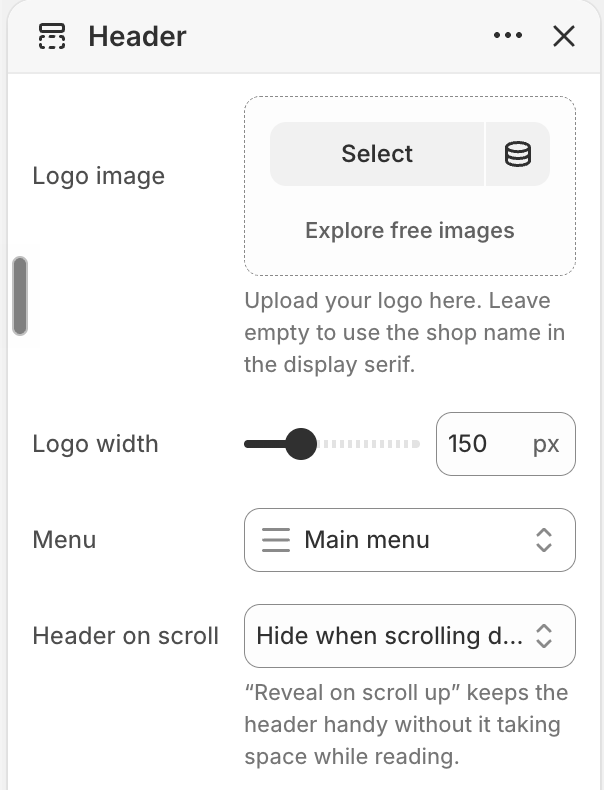
| Setting | Type | Default | Description |
|---|---|---|---|
logo | image | — | Your logo. Leave empty to use the shop name set in the display serif — the intended look for a wordmark brand. |
logo_width | range | 150 px | Width of the logo image (ignored when using the wordmark). |
menu | menu | Main menu | The main navigation menu shown across the top of the header. Also used in the mobile drawer unless a Mobile menu is set. |
mobile_menu | menu | — | Optional. A separate menu for the mobile slide-in drawer. Leave empty to reuse the main menu. |
scroll_behavior | select | Reveal on scroll up | How the header behaves as visitors scroll (see below). |
cart_label | text | Écrin | The themed word shown beside the cart icon. |
show_search | checkbox | On | Show the search icon that opens the search panel. |
search_menu | menu | — | Optional quick-links menu shown inside the search panel — e.g. Coffrets, Tablettes, La Carte Cadeau. |
Header on scroll#
Two behaviours, set by scroll_behavior:
- Reveal on scroll up (default) — the header hides as the visitor scrolls down and slides back the moment they scroll up. It stays out of the way while reading but is always one flick away.
- Always visible (sticky) — the header is pinned to the top at all times.
Respects reduced motion
The reveal animation is disabled automatically for visitors who prefer reduced motion — the header simply stays in place.
Language & region#
The header can show a compact language switcher, and hand region selection to the drawer on mobile:
| Setting | Type | Default | Description |
|---|---|---|---|
show_language | checkbox | On | A compact globe + language-code switcher beside the cart (desktop). Appears only when more than one language is published in Settings → Languages. |
show_drawer_locale | checkbox | On | Adds a language + country/region chooser at the bottom of the mobile menu drawer. When on, the compact switcher is hidden from the mobile header to save space. |
See Language & region for how switchers work store-wide.
| Setting | Type | Default | Description |
|---|---|---|---|
show_account | checkbox | On | Show the account link. Appears when customer accounts are enabled in Shopify admin — signed-in customers reach their account, others the sign-in page. |
account_label | text | Compte | Label beside the account icon. Leave empty for an icon-only button. |
On mobile
Below 900px the menu collapses into a **left-sliding drawer** (opened by the hamburger). The account link and the language/region chooser move inside it, and the cart becomes an icon-with-count to keep the bar uncluttered. The drawer shows your main menu unless you set a separate **Mobile menu**.